
InSnoop is a free, browser-based Instagram Story viewer, and the InSnoop website does that one job well. In my test, it showed a public account's Stories in about 5 seconds, opened its Highlights, and never asked me to log in. That made it the fastest of the four anonymous Instagram viewers I have tested. But it only covers Stories and Highlights, my download attempt failed with a server error, and it tracks your visit with Google Analytics and shows Google ads. Use it for quick, anonymous Story checks on public accounts, not as a full Instagram viewer.
This is the fourth anonymous Instagram viewer I have tested.
Each time, I used the same public account: NASA. Same search, same steps, different tool.
That makes this InSnoop Instagram Story viewer review different from most. I can tell you how it actually compares, not just what it promises.
The Short Story on InSnoop
InSnoop lives at insnoop.com. It is a web-based tool built for one thing: anonymous Story viewing. People call it the InSnoop Instagram viewer, the InSnoop story viewer or the InSnoop anonymous Instagram viewer, but it is the same browser-based Instagram viewer, and you use InSnoop online in any browser.
You type an Instagram username or paste an Instagram profile link, and it shows that account's live Instagram Stories and saved Instagram Highlights. Your name does not land on the Story viewer list, because InSnoop fetches the Stories, not your account.
A few quick facts:
Price: free, with no membership.
Login: no Instagram login and no account registration. InSnoop without login is the whole point.
Content: Stories and Highlights from public Instagram profiles.
Downloads: a "Download" button under each Story.
Owner: not named. The footer calls the site "a fan page" not connected with Instagram.
It is an online Instagram Story viewer for public profiles, nothing more. It is also a third-party website, so it has nothing to do with Instagram or its parent company, Meta.
From Username to Story: How InSnoop Works
How to Use InSnoop Instagram Story Viewer
It is a simple search by username:
Open insnoop.com in any desktop browser or mobile browser.
Type an Instagram username, like "nasa", or paste a profile link.
Press Enter or click the arrow.
Watch the Stories, or switch to the Highlights tab.
That is all it takes to view public Instagram Stories anonymously and view Instagram Highlights anonymously. If you were wondering how to watch Instagram Stories without an account, or how to view Instagram Stories without being seen, this is the whole trick.
There is no app to install, even though the site's FAQ mentions an "InSnoop app" once. Everything I used ran in the browser.
Behind the scenes, the photos and videos came through InSnoop's own media server, p-w.insnoop.com. That is how it shows Stories without your account. It also means InSnoop's server handles every Story you open.
My InSnoop Test, Minute by Minute
I tested InSnoop on November 3, 2026, in Chrome on a Windows computer. I only searched public brand accounts, never private people.
Here is exactly what happened, in order.
Minute 0: The Homepage
The homepage is a dark, user-friendly interface with one search box and a "Top Accounts by Category" row of 20 famous public accounts.
Before I searched anything, my browser already had two Google Analytics cookies. More on that in the safety section.
Minute 1: Searching for NASA
I typed "nasa" and pressed Enter. In about 5 seconds, InSnoop showed NASA's profile picture, name and verified badge.
Right under it, it said: "2 stories, the last story was added about 4 hours and 33 minutes ago."
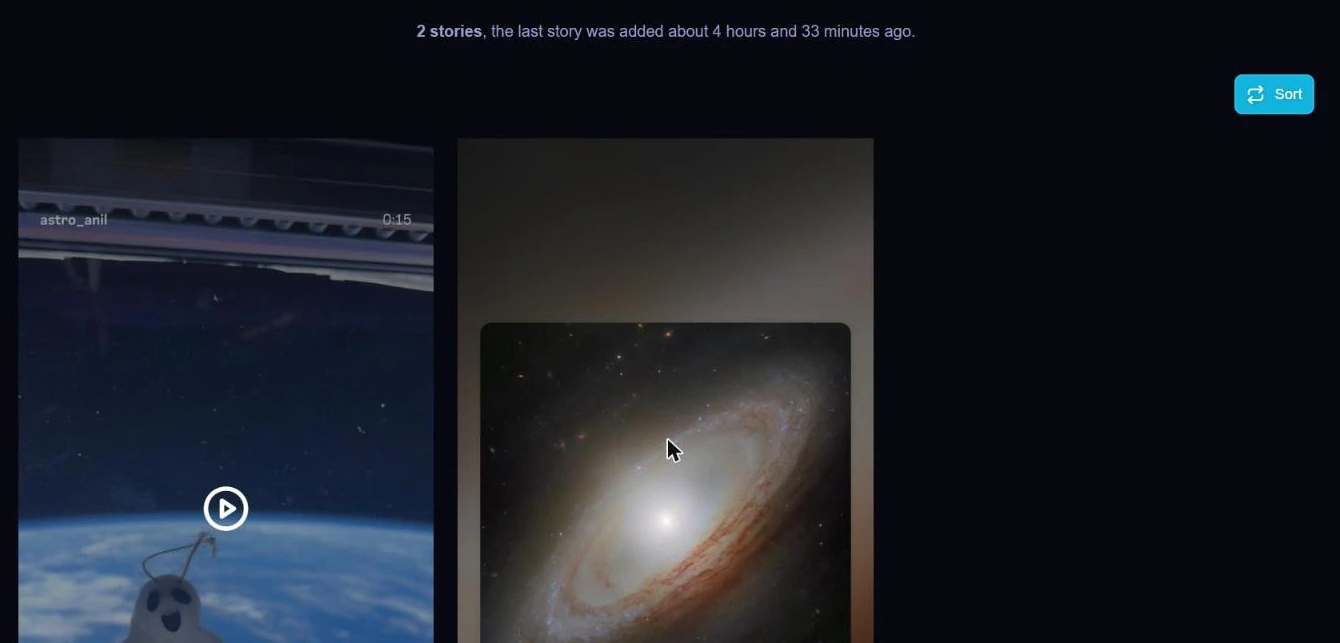 InSnoop showed NASA's two live Stories with timestamps, about 5 seconds after I searched.
That small summary line is genuinely useful. You know right away how many Stories are live and how fresh they are. Each Story also had its own timestamp and a "Sort" button to change the order.
Minute 2: Ads Appear
After the search, the page loaded Google ads. Advertising is how InSnoop pays its bills, and I counted three ad frames on the page.
To be fair, the ads stayed in their boxes. I saw no pop-ups, no redirects and no fake survey pages in my test. Some other reviews say they hit redirects on InSnoop. I did not.
Minute 3: Trying to Download
As an Instagram Story downloader, InSnoop promises photo downloads as JPEG and video downloads as MP4. I clicked "Download" under the first Story. Nothing visible happened.
I tried the second Story. This time I watched the network request. It went to InSnoop's media server and came back with an HTTP 503 error, which means the server was unavailable.
So in my test, Story downloads did not work. That may be temporary, since these tools often break when Instagram changes things, and Instagram platform restrictions are a common reason. But I can only report what I saw.
Minute 5: Highlights
I switched to the Highlights tab. Five Highlight collections showed up, including "Artemis II" and "MoonTunes".
When I opened "Artemis II", InSnoop said "11 stories" and showed the date of the last one. Highlights worked well, and as an InSnoop Instagram Highlights viewer, it did the job.
Minute 7: A Username That Does Not Exist
Last, I searched a made-up username. InSnoop showed a clear "No profile found." message. No crash, no redirect.
I also noticed my earlier "nasa" search sitting under the search box as a saved chip. The site says it stores your search history in your browser. That is handy on your own device, but worth knowing on a shared computer.
What InSnoop Shows, and What It Leaves Out
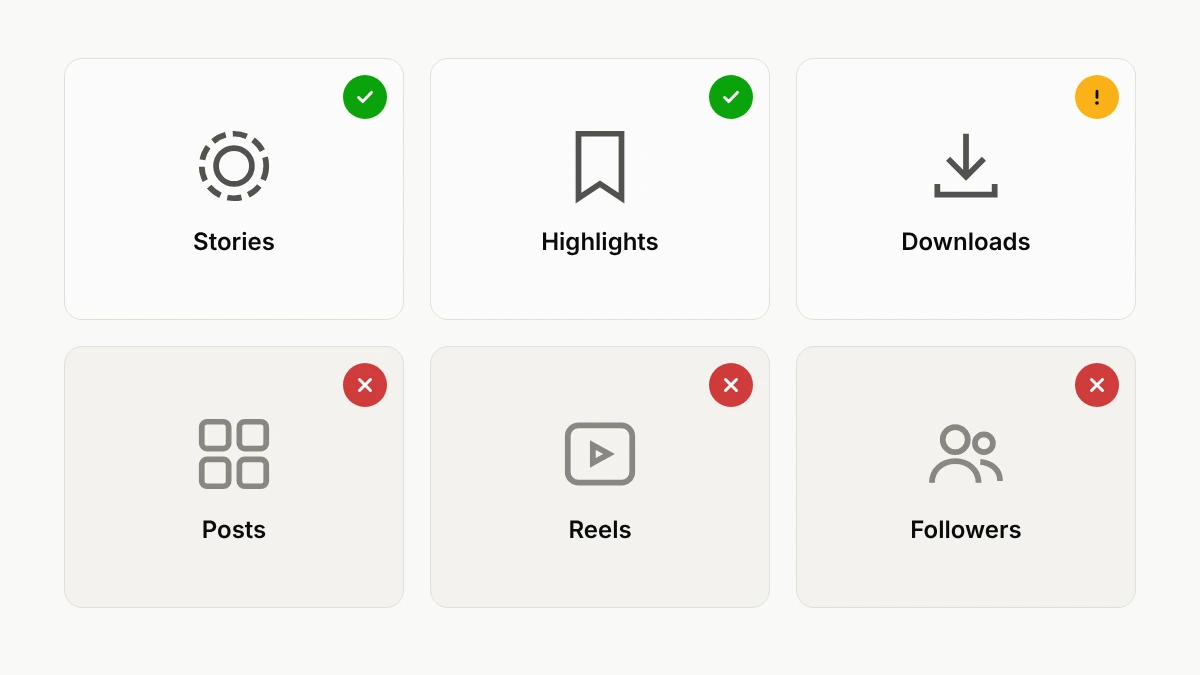 What InSnoop showed me in my test, and what it left out.
Here is the honest picture of the InSnoop features.
What it shows:
Live Instagram Stories, with a count and timestamps.
Instagram Highlights, with Story counts inside each one.
A "Tagged Users" button on the profile.
A Sort option for Stories.
What it does not show:
Posts or Reels.
Follower counts or the bio.
Private Instagram profiles.
Close Friends Stories.
So InSnoop is not an Instagram content viewer for everything, and you should not expect a full InSnoop public Instagram profile viewer. It is a Story and Highlight tool. If you want posts and Reels too, you need something else.
The Same Account on Four Viewers
This is the part I think helps most. Here is how InSnoop compared with the other three viewers I tested, all on NASA's public account.
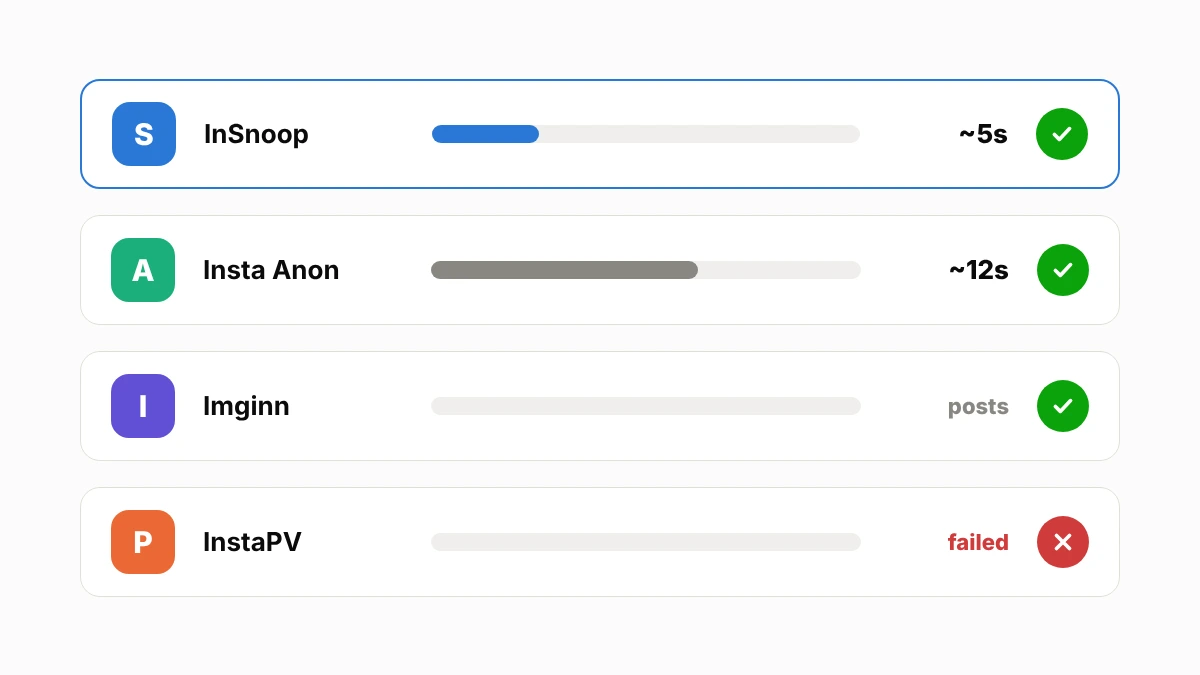 How four anonymous Instagram viewers handled the same public account in my tests.
Viewer | Test date | What happened |
|---|---|---|
InstaPV | Oct 27 | Free plan allows 1 lookup a day, and it returned "No account named @nasa" |
Imginn | Oct 29 | Profile, follower count and posts loaded fine |
Insta Anon | Oct 30 | Stories loaded in about 10 to 15 seconds, Reels failed twice |
InSnoop | Nov 3 | Stories loaded in about 5 seconds, Highlights worked, download failed |
The number of Stories was different each day, because Stories expire after 24 hours. That is normal.
For pure Story speed, InSnoop won. For a full profile with posts, Imginn was better. And Insta Anon covered posts, Stories and Highlights, but more slowly. You can read my full Insta Anon review to see how that one did on its own promises.
Is InSnoop Free?
Yes. InSnoop is free, with no membership, no premium plan and no registration. The site says it plainly: "InSnoop is available for free. Not a membership."
It pays for itself with Google ads. That is a fair trade for a free Instagram viewer, as long as the ads stay as calm as they were in my test.
One thing in the fine print caught my eye, though. The InSnoop terms say the service may charge for the app "at any time". It is free today. I would not assume it stays that way forever.
There is no InSnoop promo code or discount, and there is no need for one. If a coupon site lists one, it is not real.
Is InSnoop Safe? Reading Between the Lines
On InSnoop safety, it passed the most important test: it never asked for my Instagram login credentials. Never give your Instagram password to any viewer site. A real one does not need it.
Beyond that, here is what I found.
It Tracks Your Visit
The InSnoop FAQ says the site does not track user behavior or keep past data. My test did not match that.
Two Google Analytics cookies were set on the homepage before I searched.
A third cookie, "ssac", appeared after the search.
The page loaded Google Tag Manager, Google Analytics and Google's ad network.
The InSnoop privacy policy is more honest than the FAQ. It says it collects any personal information you give it, your IP address, the pages you visit, the time you spend on them, and your operating system. It uses Google Analytics for Firebase. It keeps automatically collected data for up to 24 months.
So you are anonymous to the person whose Story you watch. You are not anonymous to InSnoop or Google. This is not private browsing in the full sense. That is the main anonymous browsing limitation of all third-party services in this group, and InSnoop is no exception. Its website security basics are fine, since it runs on HTTPS.
The Policies Read Like an App Template
Both the privacy policy and the terms keep talking about "the app", and the policy names Firebase, a toolkit for mobile apps. Yet InSnoop is a website. The terms also do not name the company or the country whose laws apply.
The documents are recent, effective July 2026, and the privacy policy does list user rights like access and deletion. But I still could not find out who runs InSnoop. That matters if you ever want to complain or ask for your data.
Public Accounts Only
InSnoop works on public accounts only. It cannot open private Instagram profiles, and no honest tool can.
It also cannot show Close Friends Stories. On Instagram, those are only visible to people the owner adds to their Close Friends list. Any site that claims to show them is lying.
My Safety Verdict
InSnoop is reasonably safe for quick public Story checks. It needs no login, installs nothing, and showed no pop-ups or redirects in my test.
Just be clear about what "anonymous" means here. Your digital privacy toward the Story owner is protected. Your browser tracking and data collection toward InSnoop and Google are not.
And use it fairly. Watching a brand or a creator is one thing. Using any tool to keep tabs on someone who blocked you is not okay, even if the tool lets you.
Where InSnoop Wins and Where It Falls Short
Where it wins:
Fastest Story loading of the four viewers I tested, about 5 seconds.
Shows how many Stories are live and how old they are.
Highlights opened and showed Story counts.
Free, with no login and no registration.
No pop-ups or redirects in my test.
Clear error message for usernames that do not exist.
Where it falls short:
Stories and Highlights only. No posts, Reels or follower counts.
My download attempt failed with a server error.
Tracks visits with Google Analytics, despite saying it does not track behavior.
Shows Google ads.
No company name or address anywhere.
Policies refer to "the app", and the terms allow charging later.
InSnoop Alternatives
If InSnoop does not fit, here are the best InSnoop alternatives and websites similar to InSnoop, picked from the best anonymous Instagram Story viewers I know of. I tested some of these myself, as you saw above. For the others, I am going by what each site offers and what other reviews report.
InSnoop vs StoriesIG
StoriesIG is one of the most widely used free anonymous Instagram viewers. Reviews say it covers Stories, Highlights and posts, but can be heavy on ads and slow at busy times. Pick InSnoop for speed and a calmer page. Pick StoriesIG if you also want posts.
InSnoop vs Dumpor
Dumpor is a long-running free viewer. Its own website lists Stories, profiles, Reels, Highlights and followers lists. It covers far more than InSnoop. I have not tested Dumpor myself yet.
InSnoop vs AnonyIG
AnonyIG focuses on Stories, like InSnoop, and adds Reels, posts and downloads. It calls itself ad-free, but one review said its cookie popup listed close to 300 ad partners. I would treat its privacy claims with the same care as InSnoop's.
InstaPV, the Paid Option
InstaPV is a paid Instagram viewer, from $2.99 a month. In my test, its free plan allowed only one lookup a day, and that lookup failed. I would only consider it if you need daily, ad-free checks for work.
Free Alternatives to InSnoop
If you want free alternatives to InSnoop that also show posts, Imginn and Insta Anon both did more than InSnoop in my tests, just slower. Keep one as a backup, because all of these tools go down from time to time.
Where I Landed on InSnoop
After four tests, here is my honest take.
If all you want is to watch Instagram Stories without logging in, InSnoop is the best anonymous Instagram Story viewer online of the four I tried. As an InSnoop anonymous story viewer, it is quick and focused. It was fast, clean, and told me exactly how many Stories were live.
If you want posts, Reels or downloads you can count on, it is not enough on its own.
And whatever you use, remember the limit. InSnoop keeps you off the Story viewer list. It does not make you invisible on the internet.
Quick Answers About InSnoop
What is InSnoop?
InSnoop is a free website that lets you view Instagram Stories anonymously from public accounts. It also shows Highlights. You do not need an Instagram account or any registration.
How does InSnoop work?
You type a public Instagram username or paste a profile link, and InSnoop fetches that account's Stories and Highlights through its own server. Because your Instagram account is not used, your name does not appear on the Story viewer list.
Is InSnoop free to use?
Yes. InSnoop is free with no membership or premium plan. It shows Google ads. Its terms do say it may charge in the future.
Is InSnoop safe to use?
It is reasonably safe for public Story viewing, because it never asks for your Instagram password and showed no pop-ups or redirects in my test. But it tracks visits with Google Analytics and does not say who runs it.
Is InSnoop legitimate?
It is a real, working tool that loaded public Stories and Highlights in my test. But it does not name the company behind it, so you cannot check who runs it.
Can you watch Instagram Stories anonymously with InSnoop?
Yes, you can view Instagram Stories anonymously with InSnoop, but only for public accounts. The Story owner will not see your name. But InSnoop and Google can still see your visit, so it is not complete anonymity.
Is InSnoop anonymous?
Partly. The Story owner will not see you, but InSnoop collects your IP address and visit data, and Google Analytics tracks the visit. The InSnoop anonymous Instagram Story viewer is anonymous toward Instagram users, not toward the site itself.
Does InSnoop require an Instagram login or account?
No. The InSnoop Story viewer without Instagram login works with no account registration. You only need a public username.
Can InSnoop view private Instagram accounts?
No. InSnoop only works on public Instagram profiles. It cannot show private accounts or Close Friends Stories.
Can InSnoop view Instagram Highlights?
Yes. In my test, it showed five Highlight collections on NASA's account and opened one with 11 Stories inside.
Does InSnoop notify someone when you view their Story?
Does InSnoop notify users when viewing Stories? No. Because InSnoop fetches the Story without your Instagram account, the owner gets no notification and your name does not appear on their viewer list.
Can you download Instagram Stories using InSnoop?
There is a Download button under each Story, and the site says photos save as JPEG and videos as MP4. But in my test, the download failed with a server error. It may work at other times.
Does InSnoop work on mobile devices?
The site says it works on phones, tablets and desktops in any browser, with no app needed. I tested it on a desktop, where it worked well.
Is InSnoop safe for mobile users?
Yes, it is as safe on a phone as on a desktop, because it runs in the mobile browser and needs no app or login. The same tracking applies, so do not treat it as fully private on any device.
Is there an InSnoop app?
No. InSnoop is a web-based tool. Its FAQ and policies mention "the app", but there was nothing to install in my test.
Is InSnoop different from StoriesIG?
Yes. Both are free anonymous Instagram viewers, but InSnoop focuses only on Stories and Highlights, while StoriesIG also shows posts. In my experience, InSnoop's page is calmer, and it works well as an online Story viewer.
Can InSnoop guarantee anonymous viewing?
It can keep you off the Story viewer list for public accounts. It cannot guarantee full online privacy, because InSnoop and Google Analytics still record your visit.
Note: This InSnoop review is based on my own test on November 3, 2026, plus my earlier tests of InstaPV, Imginn and Insta Anon. Free viewer tools change often, so your results may differ. Please respect other people's privacy and content rights.